
































I completed the Practical Accessibility course by Sara Soueidan at the end of last year, and it completely changed the way I think about the web. I started the course expecting to learn about rules, compliance, and some code snippets. But, I ended up with a completely new mental model for how we design, who we design for, and what “quality” really means.

"More than a checklist: three things that changed how I see accessibility", Yusuf Kandemir
Full-stack developer at Dreamonkey
Practical Accessibility
Understand how web accessibility works.
Build more accessible websites with confidence—today.
Practical Accessibility is a clear, comprehensive & actionable accessibility curriculum designed to give you a clear understanding of web accessibility, and to equip you with technical knowledge & skills you need to: build more accessible websites with confidence, find and fix issues in your existing projects, and test and evaluate AI output for accessibility when you need to.
Accessibility can be straight-up difficult and intimidating. How do you get started? Where do you start? How do you know if what you’ve built is accessible? How do you find and fix accessibility issues when they come up?
There are several W3C standards and documents, and several versions of these documents. There is a lot of accessibility information scattered among blogs, Github repositories, books, and even social media posts. And there is even some conflicting and contradicting information here and there. You read an article from here and there, pick up a technique or two, but you always seem to be missing something. You feel like you need direction.
You’re not alone — I’ve been there too. I know how frustrating it can be to sift through scattered articles, outdated docs, and contradictory advice. I know how easy it is to make well-intentioned mistakes.
But here’s the thing: accessibility isn’t always as hard as it seems, especially if you know where and when to start.
And this is why I created Practical Accessibility: it is your trusted companion and roadmap, guiding you step-by-step through the fundamentals and practical techniques you need to create accessible websites with confidence and clarity, whether you use AI in the process or not.
In this course, you will find answers to questions like:
- What is the thought process for building accessible components from scratch?
- Do I need JavaScript to make this accessible?
- Why is semantic HTML so important? And how do I know which HTML element to choose?
- What is the accessibility tree and accessibiliy API? and what do they tell me about the accessibility of my components?
- When do I reach for ARIA versus native HTML?
- How do I navigate the different ARIA and WCAG documents?
- How does CSS affect accessibility?
- Why are accessible names such a big deal? And which technique should I prioritize when providing names to my components?
- What are the best practices for creating and validating forms? And why is native HTML5 form validation not enough?
- How do I announce content updates to my users without degrading the screen reader user experience?
- How can I test and validate the accessibility of the code my AI agent has generated?
- How do I know if what I’m building is accessible?
If you’re a:
- Web UI engineer or front-end developer
- Web designer who codes or who works with developers
- Web designer who uses AI to generate code for their designs
- JavaScript or back-end developer producing or working with frontend code (HTML, CSS)
…and you want to stop guessing and start building with confidence, then Practical Accessibility was made for you.
Since its launch, Practical Accessibility has been trusted by designers and engineers at some of the biggest companies, state governments, and educational institutions in the world, such as:
*Proud to have learners from these organizations! The logos do not indicate any affiliation, sponsorship, or endorsement of this course. All trademarks are the property of their respective owners.
At TetraLogical, we’ve created a multi-month programme to help Associate Accessibility Specialists level up to become Accessibility Specialists. We’ve made Practical Accessibility a required part of the programme because it’s an excellent introduction to the technical aspects of web accessibility.

Léonie Watson
Co-Founder and Director at TetraLogical
I'm working on accessibility at Figma and your course has become our defacto suggestion for people who want to learn more themselves. On just about every accessibility-related internal doc there's a mention!

Drew Powers
Design Engineer + Accessibility at Figma and co-creator of Astro
This course is first class. With Global Accessibility Awareness Day fast approaching now is the best time to learn accessibility (the practical way as Sara says) #GAAD

Beth Fernandes
Accessibility Lead at Apple
I'd seen Sara’s presentations for years before, so I knew it would be great. It was an instant buy, and so worth it. I recommend the course to everyone I can. It's the best course I've seen on accessibility.

David Leininger
Staff Software Engineer for Design Systems and Accessibility at The New York Times
Inside Practical Accessibility A comprehensive curriculum designed to help you develop a mental model for how web accessibility works.
40
+
in-depth lessons
15
+
hours of video
190k
+
words of text
Every lesson in Practical Accessibility is designed to be clear, focused, and immediately actionable—no filler, no fluff.
From practical theory to practice
Throughout the course, we will alternate between theoretical chapters and practical ones.
The theoretical chapters are essential to your accessibility knowledge and will give you a deep and solid understanding of the What and Why of accessibility. But while they are theoretical in nature, they provide high practical value.
And then we will go over the How. We will walk through the process of building a few common UI patterns step by step, using the learnings from each chapter. And you will see examples of how various assistive technologies affect the way you mark up and style your content.
You will learn not only what to do, but also what not to do, and I will share with you my thought process for writing HTML, CSS, and JavaScript more responsibly. And I will recommend tried-and-true practices for creating common design patterns in an accessible way.
As you go through the course, you’ll gain a solid understanding of the mechanics of accessibility. The course will teach you how web accessibility works under the hood, and how the code you write (HTML, ARIA, CSS, JavaScript) is communicated to assistive technology users.
You will develop an understanding of how to implement accessibility in your work, even if AI does much of the coding for you. AI may accelerate your implementation; Practical Accessibility gives you the technical knowledge to evaluate whether the implementation is actually accessible.
A practical foundation for your day-to-day accessibility work
The course curriculum contains two full-day workshops-worth of content that you can access anytime, anywhere. The topics covered in the course will cover the majority of your day-to-day accessibility implementation requirements. The curriculum covers:
Accessibility vs inclusivity vs usability
You’ll learn about how people with disabilities access the web, and how this impacts how you design and develop your websites and applications
The Web Content Accessibility Guidelines (WCAG).
Everything you need to know about the WCAG documents and about using its informative supporting documents in your day-to-day work. You will learn about the Understanding WCAG documents, the Techniques for implementing WCAG, and the WCAG Quick Reference.
The accessibility tree and accessibility APIs (AAPIs).
Your secret accessibility weapon. You’ll learn everything you need to know about using the accessibility tree information in the browser DevTools to find and debug common accessibility issues in your everyday work. You will also understand what accessibility API mappings are, and what they mean to how you write HTML.
Setting up your screen reader testing environment on your machine.
We will discuss the most popular screen reader and browser combinations, and how to set up a testing environment on your machine.
Accessibility in semantic HTML.
In this section, you will learn about HTML in a way that’s most likely very different from what you’re used to learning elsewhere. And you will understand why “use semantic HTML and get accessibility for free” is a blanket statement. This is my favorite section of the course, and it covers accessibility in semantic HTML, Accessibility API mappings, landmark regions, heading structure and hierarchy, and more.
Responsible ARIA.
In this section of the course we’ll take a (very) deep dive into ARIA! You will understand what ARIA attributes are, what they do and don’t do, and why and when you will need them. You will learn what it takes to create your own custom ARIA widget using ARIA, and why using native HTML is almost always better than rolling your own custom implementation.
You will learn about the rules of ARIA use in HTML. And you will understand what the ARIA Authoring Practices Guide is and, more importantly, what it isn’t so that you (or your agent, if you’re using AI) can get the most out of what it offers.
Building accessible disclosure widgets and accordions.
These chapters are highly technical chapters that will teach you the requirements and thought process involved in creating accessible disclosure widgets—a building block for many other complex components, including accordions. Among other technical details, you will understand why using the HTML name attribute alone is not sufficient to make an accordion out of a series of <details> elements, as well as usability considerations to keep in mind for deciding whether or not a disclosure widget or accordion are suitable for your user interaction.
Hiding content with HTML, CSS, and ARIA.
This section covers the different approaches for hiding content using HTML, CSS, and using ARIA. You’ll understand the pros and cons of each approach so that you can make a more informed decision when you need to choose the appropriate method for the design pattern(s) you’re designing or building.
Accessible names and descriptions.
In this section of the course you’ll go through several chapters that explain the different techniques you can use to provide accessible names to elements, what happens when you don’t provide one, and what happens when competing names are provided. You will learn about the accessible names and descriptions computation algorithm, and what it means to how you should provide accessible names to your components. You will also learn about concatenating accessible names using ARIA attributes to create more ‘D R Y’ interactive components. And we will also cover how to create interactive components that are usable by Speech Control users.
Building accessible drop-down and slide-out navigation.
You will learn the requirements and recommended practices for building website navigation. We will discuss two different patterns for creating a usable drop-down website navigation. You will understand the difference between a navigation and a “menu”, why you shouldn’t use the ARIA menu role(s).
Page accessibility.
Accessibility starts at page level. Users need to be able to identify pages, and assistive technology needs to identify what language to speak the page in. In two chapters, you’ll learn all about identifying the topic and language of a page and its content, and why doing so is important.
Accessible images.
Everything you need to know about providing effective alt text for images.
Accessible forms.
In this section consisting of three chapters, we will cover everything you need to know about grouping and labeling form fields, providing accessible instructional cues and descriptions to fields, methods for accessible form validation, and you will learn how to improve the usability of your form validation using keyboard focus management.
Accessible notifications using ARIA live regions.
We’ll discuss the native accessible notification system provided by ARIA, and how to use it responsibly in your Single Page Applications (SPAs).
Keyboard accessibility.
This section includes chapters on the importance and techniques for providing navigational aid for keyboard users using skip links (including in-page skip links), designing WCAG-conformant focus indicators, and managing focus in custom interactive widgets using the roving tabindex technique.
Forced Colors Modes.
You’ll learn about display modes, and you’ll take a deep dive into forced colors mode, and why and how you should adapt your content for this mode. You will walk away with deceptively simple yet impactful techniques and code snippets for optimizing your content and custom ARIA widgets to ensure they remain usable.
You’ll walk away with a clear mental model of how to approach accessibility in your work, as well as techniques you can apply right away to make your projects more accessible.
By the end of the course, you will be armed with the knowledge, techniques, and resources to:
-
Quickly identify common accessibility issues when they come up.
-
Fix existing accessibility issues in your current project(s).
-
Implement more accessible user interfaces from scratch.
-
If you use AI:
- Provide clearer instructions to your AI agent
- Test, evaluate and diagnose AI agent output for accessibility
-
Go from feeling overwhelmed to feeling more confident in your skills and your ability to create websites and applications that work for people with disabilities.
-
Become an accessibility champion and make a positive impact on the Web and the world! 💪🏻
It was a pleasure taking the course. Not only did I learn a lot, but I truly enjoyed it. The course gave me new insights into programming and accessibility that I wasn’t expecting; it feels like a significant milestone in my career.
Thank you for such a dedicated and well-structured course. For anyone thinking about starting out or going deeper into accessibility, I honestly couldn’t recommend it more, it’s a real before-and-after. Beyond resources and techniques, it opens new perspectives that can improve any digital project from the start.

Jonás Calvo
Creative UX Developer

Hey, I’m Sara, a front-end UI engineer and the creator of this course.
When I started learning accessibility in 2016, I felt lost and overwhelmed. There is a lot to learn—and a lot of conflicting or incomplete advice online. I was unsure where to look to find the information I needed. I wanted to learn, but I needed direction. And you may be here now because you find yourself in a similar position to where I was before.
On my learning journey, I was lucky to have friends I could turn to for answers and advice whenever I got stuck. That helped me navigate the world of accessibility with more confidence. I’m hoping that Practical Accessibility will give you the kind of guidance and confidence that those friends gave me on my journey to learning accessibility.
Over more than a decade, I’ve built websites for clients, and have helped thousands of designers and developers level up their craft through in-person workshops and educational content. I have combined my expertise from building accessible UIs and teaching accessiblity to create the course I wish I had when I got started in accessibility. I built a course that brings the different pieces of accessibility together into one practical, structured curriculum, so you don’t have to piece them together yourself. I created this course to help guide you to truly understand how web accessibility works, so you can skip the guesswork, and apply accessibility effectively in your own work—today.
One thing I learned on my journey is that you don’t have to become an accessibility expert before you make your websites and web applications more accessible. What you need is a guided, structured path through the concepts that matter most, with enough technical depth to help you understand what you’re doing, and enough practical experience to know whether it actually works.
Practical steps towards building more accessible websites with confidence today
-
1
Take the course and start the curriculum.
For $399 you get lifetime access to the full Practical Accessibility curriculum and toolkit. Go through the chapters—watch the videos, or read the text adaptations—at your own time and your own pace; at work, on your couch, or on the go. Binge watch the videos in one night or spread them out over several weeks. There is no timeframe for completing the course.
-
2
Apply what you learn as you go.
As you progress through the course, apply the concepts you learn to your current project(s). This hands-on approach will help solidify your understanding and build your confidence in implementing accessible design practices. Whether you're starting a new project or working on an existing one, you can start applying the knowledge and skills you learn to create more accessible work, improve the accessibility of your existing projects, and use AI more effectively to produce accessible code. You don't need to have finished the course before you start producing more accessible code.
-
3
Test & review your work.
Use browser devtools, keyboard navigation, and screen readers to review your implementations and make necessary adjustments to improve their accessibility. In the course, you'll learn about various tools and methods that can help you identify and fix accessibility issues.
-
4
Ship more accessible products.
By now, you should have a solid understanding of the mechanics of accessibility, and be able to implement accessibility practices more effectively in your projects. Continue to prioritize accessibility in your development workflow and ship more accessible products to production, and use your accessibility skills to differentiate yourself in the market.
I enjoyed your course very much. As I was going through it, I found myself going back in my work project and doing accessibility audits of my own as well as applying what I learned on my current work.
I think as someone with a fairly good understanding of accessibility, I had a lot of gaps in my knowledge that this course was able to fill. [..] There's still a lot more to learn but I feel like I have a much stronger foundation to also stand on, so thank you.

Quasar Wei
Senior Software Engineer
This course was absolutely amazing. It took me quite a long time to complete as I changed my base website template with something I learned almost every chapter! Can’t recommend this course enough.
Kaitlyn Martinez
Associate Director of Development and Accessiblity at Click Rain
What You Get
-
15+ hours of Captioned Video
The course contains more than 15 hours of on-demand video content that you can watch at your own time and your own pace. That’s two full-day workshops worth of content! The course is English spoken, and closed captions are available in English.
Complete Text Adaptations
If you prefer, you can learn by reading. Each chapter is available in text format. The text adaptation of a each chapter contains everything covered in the video, so you don’t need to worry about taking notes while you watch the videos. You’ll get over 190,000 words of in-depth content you can refer to any time you need to.
Certificate Of Completion
When you finish the course, you can request a Certificate of Completion to showcase your skills on your résumé or LinkedIn, to build client trust, to present to your boss at work, to share it with your friends and colleagues on social media, or simply to feel good about your accomplishment.
Credits for Your IAAP Certification
Practical Accessibility is eligible for IAAP education credits. If you have an IAAP certification, then after finishing the course, you can submit your course certificate of completion for credits through the IAAP Certification Portal. Because the course contains over 15 hours of video content, you can request and earn 15 credits – that’s the whole year of credits for CPACC and just a little shy of that for CPWA.
Accessibility Toolkit & Exclusive Perks
Inside the course, you’ll find a curated (and growing) selection of useful accessibility documentation, checklists, cheatsheets, helpful tools, and resources for you to have handy and use in your day-to-day work.
Included in the Toolkit are exclusive perks and bonuses to enhance your learning experience:
- 🎁 Free, 6-months Unlimited Access to Assistiv Labs. When you buy the course, you’ll get a complementary, 6-months unlimited trial to Assistiv Labs—“The Browserstack of accessibility testing”. Activate your trial when you’re ready to start testing!
- 🎁 Free, 60-days Full-Featured Polypane Trial. You’ll also get a complementary, 60-days full-featured trial, and a 20% recurring discount after that, for Polypane—a stand-alone browser for web developers that includes dedicated testing tools for accessibility practitioners.
A Current Accessibility Curriculum
Unlike AI knowledge that depends heavily on its training data and which may not reflect the latest web platform and accessibility developments, the Practical Accessibility curriculum is periodically reviewed and updated as necessary to stay up to date with the latest web standards, so you have a reliable and current reference at your fingertips. Get peace of mind and confidence knowing that you’re staying ahead in a field that doesn’t stop changing.
This is by far the best accessibility course I’ve ever taken. It’s very thorough and extremely well explained. If you have an education budget at work (or if you don’t but have the funds to buy it personally) you can’t go wrong with Sara’s course. It’s worth every penny.

Emma Dawson
Full stack software developer
Sara’s practical-accessibility.today course is truly fantastic!
I don’t shill for very many things, but this one actually meets the high expectations I had. I paid out of pocket for this course and it was totally worth it.

Mayank
Design engineer, Mayank.co
I bought this course when Sara first released it, and no purchase helped me in the field of digital accessibility as much. If you do any kind of front-end development or design system work, go get it!

Jesse Gardner
Director, User Research at New York State Information Technology Services (NYSITS)
@sarasoueidan.com is one of the best in the field of accessibility, and her Practical Accessibility course gives you the full rundown on creating accessible sites.
Accessibility can be tricky, so here is your chance to gain a comprehensive, practical understanding.

Declan Chidlow
Front-end Developer and Writer, vale.rocks
By far best and absolutely outstanding and exhaustive online video course […] it’s definitely worth every cent. And your users will thank you for it, I promise.
And no, I am not affiliated in any way with Sara and get nothing for promoting it. It just makes the world a bit better if just one person watches this course as a consequence of my post.

Roman Seidelsohn
Senior Frontend-Entwickler at Springer Nature Technology and Publishing Solutions
Sara Soueidan is second-to-none in her comprehensive knowledge of accessibility, and her online course is so massively helpful and valuable. Do yourself (and your team and the world) a favor by getting it! 👇

Brad Frost
Web designer & developer, design systems consultant bradfrost.com
Ready to build more accessible websites—with confidence?
Get access to the entire course content, plus all future content updates.
$399
Price shown in US Dollars and excludes sales tax/VAT where applicable. By purchasing the course, you agree to our Terms of Use.
- Buy once, access forever
- Lifetime access to all course materials & future updates
- 15+ hours of captioned video
- Text adaptations
- Certificate of completion
- Customer support
- 🛡️ 30-day money-back guarantee
Equip your whole team with a shared accessibility foundation
Practical Accessibility packs a substantial amount of technical depth into 15 focused video hours, which makes it ideal for teams who want practical & actionable accessibility training without weeks of developer downtime.
A team license is a great way to equip all of your team members with a shared, practical understanding of accessibility requirements and best practices. With a team license, you can purchase multiple seats for all of your team members. Each team member will have full access to the full contents of the course. A bulk discount is available when you buy more than 4 seats.
Get Team Access Today
Real Feedback From Real Learners
Practical Accessibility has helped government employees in the UK and Canada, web developers in Germany, UI/UX designers in France, university staff educators in Australia, accessibility specialists and consultants in the United States, and many, many more. Here's what some of them had to say about the course:
I just finished what you called your “favorite chapter,” chapter 6, of Practical Accessibility. I wanted to let you know that the clarity and depth of what you are sharing are impressive and I am learning so very much. There is so very much more to accessibility than I ever could have imagined and you have made it, well, so very accessible.
Thank you for this excellent body of work. I plan to do a deep dive into several of my sites, starting with all of the html elements that I use and if I have used them correctly. I’ve already tried out VoiceOver to see what it does with my own site and I have some work to do. With the knowledge that I’m gaining from your course, I’m feeling more confident that I can get it done.

Bob Monsour
Web hobbyist and creator of the 11ty Bundle
I have just completed your course, and I think it’s great! You have done tremendous work putting all this information together. In my ~10 years career as a web developer, I was only recently asked to care about the product being accessible. Even when studying, this topic was not handled properly. Working on my current project and finishing this course changed my perspective and how I will approach web development in the future. Thank you!
Przemysław Lewandowski
Senior Javascript Developer, STX Next, Devansoft Interactive
Thank you so much for this course with all of its incredibly valuable content! I cannot imagine the amount of work you’ve put into this, it still blows my mind.
Your course is a lot to take in but let’s face it: it’s SO necessary to get a broad yet deep understanding of how to be inclusive, being a designer, a PL/PO, or an engineer!
All those hands-on examples have been crucial to fully understand what’s been discussed. And the sources? In times of searches becoming a huge part of the enshittification of the web? Worth a thousand bucks. I’m gonna need a couple of week to work myself through them though :D
So even if it’s a lot, Practical Accessibility is the absolute BEST out there to have “all you need to know” in one place. More people should do the course and I will definitely recommend it at work.
Practical Accessibility definitely already helped me in understanding why certain components and modules at work are build the way they are build. Taking a step back in looking at semantic HTML first even more than before, was a real wake up call. As was “the lesser ARIA the better”.
Amazing work, all around. This course will be my main source of truth for a long time to come! I’m certain that this will get me on a good path in becoming a more inclusive Frontend Developer.
We are working for the German government so we’re already on a good path re: Accessibility. As always: there’s room for improvement :) Thanks again for all the amazing work you’ve put into Practical Accessibility!

Elle Hanschen
Frontend Engineer at Materna Information & Communications SE
Thank you so much for such an amazing course! There’s a lot about accessibility, like ARIA and WCAG, that have seemed so intimidating and overwhelming to me. Your course has demystified so much and it feels really empowering to learn about!
Joey Pearlman
UX Designer
Ahead of my CPACC renewal, I decided to take Practical Accessibility by Sara Soueidan because I wanted to close a gap I kept running into.
When I was conducting accessibility audits in my last role, I didn’t want my work to feel like “here’s what’s wrong.” I wanted to give teams context, answer “so what?”, and make the path to fixing things feel doable. But to do that well, you have to understand what implementation actually means.
Sara’s course did exactly what I hoped. Even though I’m not a dev, it helped me understand accessibility in a more hands-on way and translate audit findings into clearer dev actions.
I’m proud of what I accomplished being mostly self-taught as the accessibility person on my team, and this course genuinely took things to the next level. Excited to carry this into my next role and keep building products that work for more people.

Kaila Thomas, CPACC
UX Designer
S’il y a une formation sur l’accessibilité que je recommande les yeux fermés c’est bien “Practical Accessibility” de Sara Soueidan.
[…]
Parce qu’il y a une chose que je ne supporte pas, c’est quand je suis des cours, lis des articles et que je sens qu’on ne reste qu’à la surface, qu’il manque un grand nombre de détails et que de nombreuses subtilités ne sont pas abordées.
Mais avec “Practical Accessibility”, à aucun moment je n’ai senti qu’il me manquait des infos. Parce que chaque thème que Sara aborde, elle l’aborde de manière complète, tous les détails, toutes les subtilité, tous les tests, tout y est. Et pour élargir encore plus les thématiques, des liens sont disponibles à la fin de chaque cours.
Plus de 40 leçons pour la formation au contenu le plus complet que j’ai pu suivre depuis 3 ans que je me forme dans le domaine. Des leçons à la fois sous format texte et en vidéos, rien n’est laissé de côté.
Et si vous avez des craintes concernant l’anglais, ne vous en faites pas, le contenu est très facile à comprendre et Sara est la personne avec l’anglais le plus facile et le plus agréable à écouter et à comprendre.
Je continue au quotidien d’utiliser cette véritable encyclopédie d’informations !

Sonia Margollé
Développeuse web freelance - Spécialiste accessibilité
Oh it was fantastic. I’m a big fan of Sara and despite having been in the accessibility space for several years now, I still learned a number of very helpful things! Sara’s incredibly well researched and it really shows in this course. I think this would uplevel an engineer way better than some of the other courses out there. She went deep into some important topics that other courses just skim over.
We are using the course as part of training in our Accessibility Champions program. 🙂
Juliette (Rapala) Russum
Senior Software Engineer and Tech Lead at The New York Times
At the risk of you having heard this a few times already 😉: I can’t tell you how much I appreciate your extremely valuable course. It has given me the confidence to work my way through the material, and over the last few months I’ve also been doing a course on accessible web design at the Johannes Kepler University in Linz/Austria. These two parts complement each other perfectly and I have recommended your course to my colleagues time and time again. Thank you for your prudence, your precision and your passion for the subject, I will take this as an example!

DI Birgit Riese
Freelance Web designer
Thank you for a wonderful course. I have enjoyed it very much, and I’m happy that I finally found an accessibility course that is actually practical. I have been searching for a very long time to find something like this, that really deals with how to and why you should build websites with accessibility in mind. Great explanations and great examples.

Bjarni Olsen
Technical director at AKQA Denmark
We really enjoyed your teaching style. The fact that all the material was available in multiple formats (written, video, captioned) was fantastic. I especially liked how when presenting a new concept, you didn’t just tell people the right way to do things, you shared a lot of ways to address the problem, and the potential benefits and shortcomings of each. That aspect in particular helped my understanding tremendously. Kai Pepler UX Designer, Experience Design Group (EDG), Xerox Corporation I also wanted to take this opportunity to say that this was one of the best (if not the best) trainings I did. With your presentations, and additional sources listed by you it is very comprehensive. It really allowed me to get very deep into the topic of a11y in those few months, and understand it on level I always wished for. Marek Szmyt Senior Product Designer at HolidayCheck Sometimes you go through a course to learn what you need and then move on. It’s not the case here. Instead, this is much more like a favorite book worth picking up time after time. It’s an absolutely practical, approachable, and enduring reference. Sara’s insight and expertise have made me a better practitioner and I’m thankful for a resource like this. Jeremy Elder Staff Product Designer at Gitlab Acabo de terminar el curso de accesibilidad de Sara Soueidan.


A diferencia de otros cursos, en el que siempre se hablan de las mismas cosas, en el curso de Sara es un no parar de aprender nuevas cosas y que debes practicarlo, probar, probar y probar.
Es la mejor inversión que he realizado por ningún otro curso. Totalmente recomendable.

Iván González Albizu
Web Designer, Capgemini
I was lucky to get early access to the course, and I can say it’s the most comprehensive, easy-to-follow course I’ve seen. Sara has obsessed over every detail. It’s absolute gold. Shaun Conner Digital accessibility lead at UK Government Digital Service (GDS) Sara’s course stands up as the best accessibility training I’ve done - it’s the course I recommend to anyone with learning budget. Geri Reid Lead Accessibility Specialist, Just Eat Takeaway.com Der englischsprachige, kommerzielle Kurs besteht aus aktuell 19 ausführlichen Kapiteln und will das Thema Barrierefreiheit im Web praxisnah, zeitlos und möglichst zugänglich erklären. Dabei vermittelt es Basiswissen zu (beispielsweise) zugänglichen Formiularen, Buttons versus Links, ARIA und Tastaturbedienung, betont die Wichtigkeit von semantischem HTML und bietet mit dem “Toolkit” einen Werkzeugkasten zum Thema an. Practical-Accessibility.today erreicht meiner Meinung nach seine gesetzten Ziele und ist als sowohl ausführlicher, wie auch gut erklärter Kurs und seine 399 Dollar auf jeden Fall Wert. Marcus Herrmann Freelance Web Accessibility Specialist (IAAP certified) and web developer



Got Questions?
Below are answers to some of the most frequently asked questions I get about the course. If you have a question that's not listed below, send it to support@practical-accessibility.today and I'll answer it as soon as humanly possible.
Is the course up to date?
Yes! I am closely following developments and updates in Web platform features and browser support for these features and I'm periodically making updates to the course chapters as needed.
When you purchase the course, you will have access to a Changelog that includes a list of all relevant updates.
Please note that to ensure the content of the course remains as practical as possible, I will only add new features to the course when they become stable enough to be used in real projects, or when you can use them as a progressive enhancement in your current projects.
My goal is to ensure that the course remains as relevant and valuable to your work as possible.
Who is this course for?
The course is primarily aimed at front-end designers & developers, and JavaScript engineers, as well as back-end developers who fiddle with front-end code and want to make sure they do so in an inclusive manner. Whether you write your HTML or CSS yourself, or you use a JavaScript framework to produce them for you, you should ensure that the code that powers your websites and applications is accessible.
The content of the course is focused on technical accessibility requirements and implementations. It does not currently address visual UI/UX accessibility requirements (like typography and colors). But if you’re a designer who knows some HTML and CSS , this course can help you understand technical accessibility requirements and constraints so you can make more inclusive design decisions, as well as collaborate more efficiently with the engineers on your team (which may make you your engineering team’s favorite designer!) You’re the ideal audience of the course if you are:
- a developer who wants to understand accessibility and implement Web user interfaces that work for people with disabilities
- a design engineer working closely with designers, diagnosing accessibility issues in the design before they make it to implementation
- a designer who works closely with developers (who ideally also knows some HTML and CSS) and wants to level-up their accessibility knowledge and improve their collaboration with engineers
Yes! The course is 100% beginner-friendly. I designed the course to be inclusive of individuals with little or no prior accessibility experience. So, you don’t need any prior accessibility knowledge to take it. That being said, the content of the course starts with the basics of each topic covered, and builds up to more advanced concepts. We will discuss different accessibility topics in-depth, and we will tackle some of them from angles that may be different from what you are used to. If you’re a beginner in accessibility, you will acquire the knowledge that will make an accessibility champion within your team. 🎖 And if you’re already comfortable with accessibility and just want a good refresher, I’m confident that you’ll find a lot of value in it, and you will probably even learn a few new things!
Can I take this course if I am a complete beginner in accessibility?
You should have a basic knowledge of HTML and CSS to get the most out of the course. We cover high-level JavaScript functionality for some of the design patterns we will build. You should know JavaScript if you want to create some of the custom widgets yourself, but you don’t need to be proficient with JavaScript to follow along in the course.
Do I need to know HTML, CSS, and JavaScript?
Yes, absolutely! The course is very practical (hence the name!). You will be able to take the knowledge and techniques you will learn and apply them in your own work right away.
The course is also framework-agnostic by design. We won’t use any JavaScript or CSS frameworks. So, you will be able to apply everything you learn to any web project, regardless of what frameworks or stack you’re using.
Will I be able to apply what I learn in my project(s)?
Yes. Once you’ve finished a chapter, you can manually mark that chapter as complete. We don’t automatically track your progress. I care about your privacy and understand and respect that everyone learns at their own pace, and some people sometimes need or want more time. And the last thing I want to do is to make you feel uncomfortable.
When you mark a chapter as complete, a visual indicator is shown for the chapter indicating that it has been completed, so you can get a clear overview of which chapters you have left by looking at the list of chapters on the course Chapters page.
Can I track my progress as I go through the course chapters?
Yes! If you need a certificate of completion to present to your boss at work, to include in your CV, or to share it with your friends on social media, or simply to feel good about your accomplishment, you can send me an email. Make sure to include your full name as you would like it to appear on the certificate.. Me or someone on my team will then generate the certificate for you (in both PDF and JPEG formats) and send it to you.
Do you offer a certficate of completion?
Yes, the Practical Accessibility course is eligible for IAAP education credits. After finishing the course, you can submit your certificate of completion for credits through the IAAP Portal. Because the course contains over 15 hours of video content, you can request and earn 15 credits—that’s the whole year of credits for CPACC, and just a little shy of that for CPWA.
Does the course provide IAAP education credits for the CPACC/CPWA certifications?
Yes! To qualify for a student discount, you must be currently enrolled in a full-time educational institution.
To receive a discount, please email our support team with proof of enrollment, such as a student ID card or registration paperwork.
Yes! If you are in a country with significantly lower purchasing power, you should see a box that allows you to enable regional pricing if you need it, so you can purchase the course at a lower price.
Yes! With a team license you can buy a number of seats to allocate to employees, friends, or anyone you’d like to support by gifting or donating the course to.
Seats are not transferable — they cannot be re-assigned once used.
Team packages will come with bulk discounts. Please note that due to their nature, refunds are not available for team packages.
Learn more about team packages. For enterprise licenses and/or in-house training, please reach out to sara@practical-accessibility.today for details.
Do you offer discounts for students?
Do you support Purchasing Power Parity (PPP)?
Can I purchase multiple licenses for my group or team?
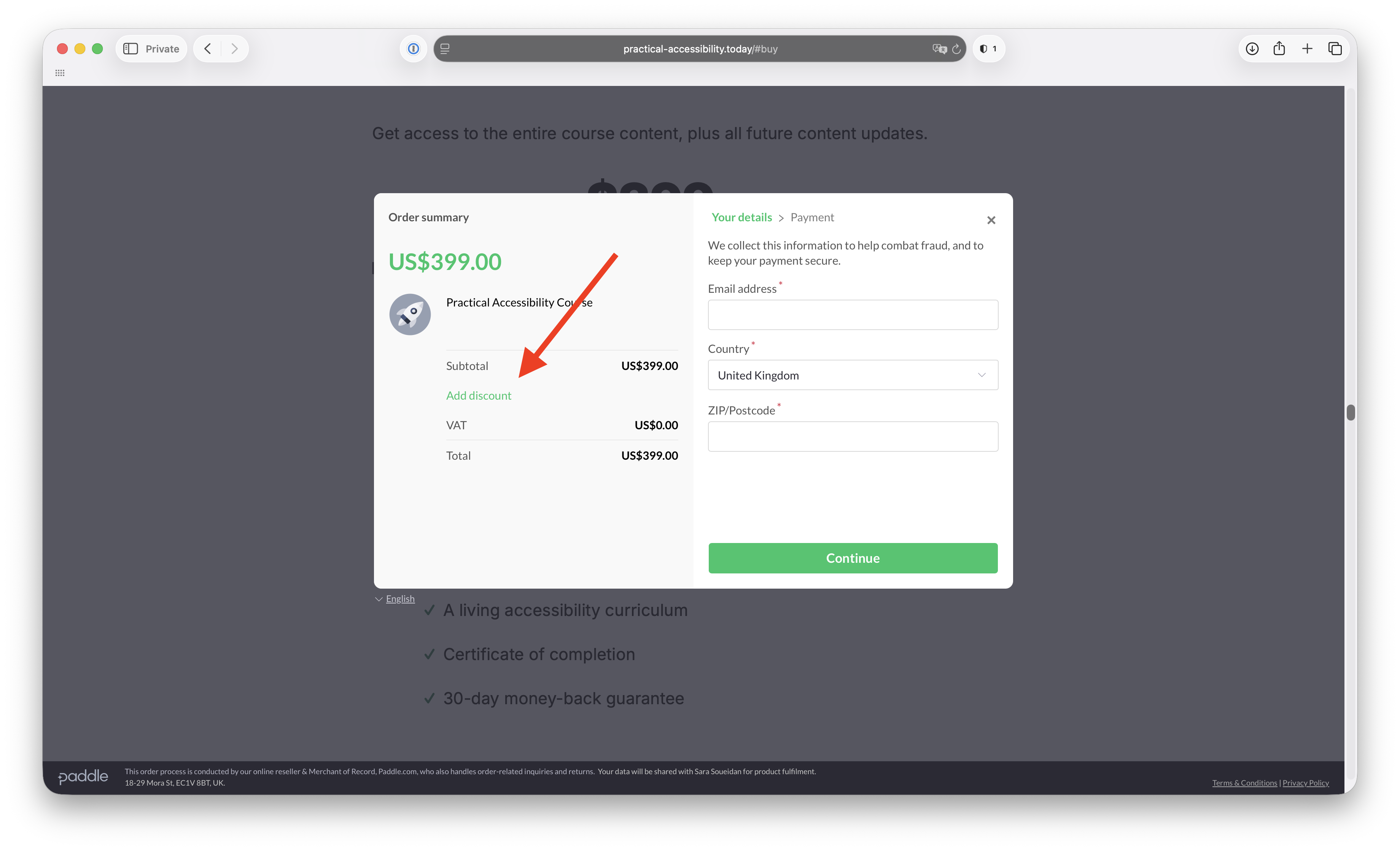
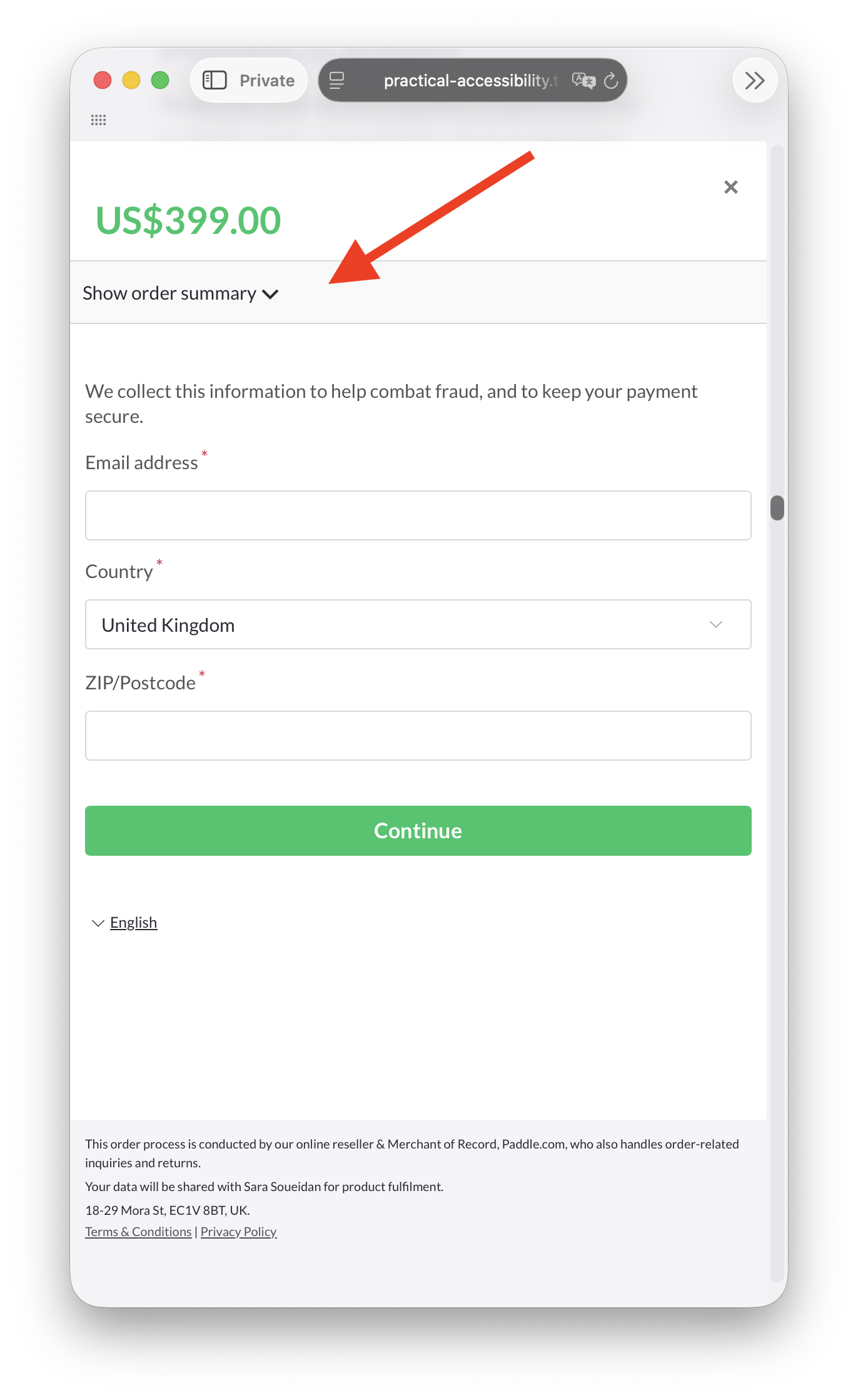
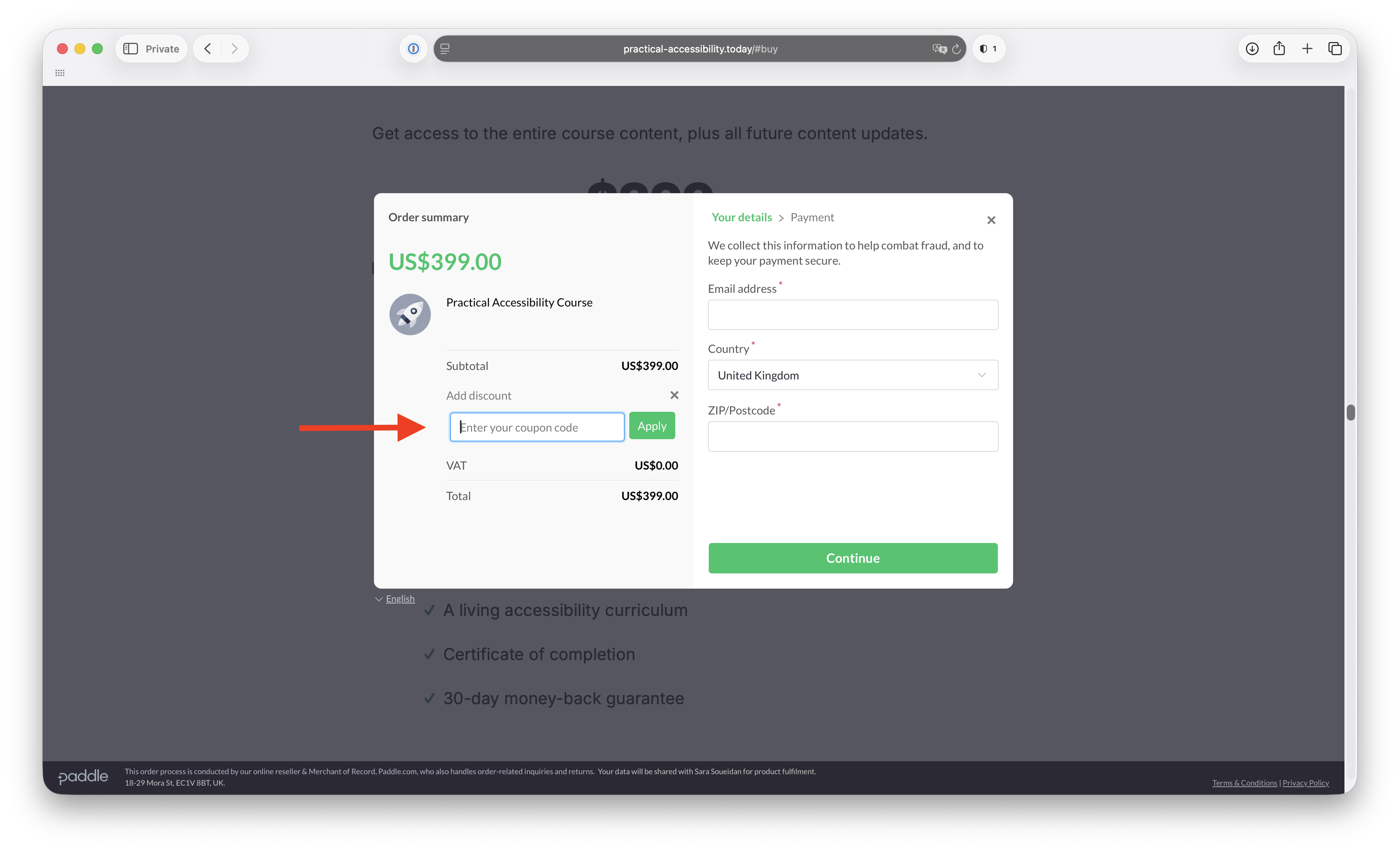
Yes! You can do that by entering their email address instead of yours during checkout. When you do, they will receive an email to set up their account and access the course content. The only caveat here is that they will receive a copy of the purchase receipt, which will include the last 4 digits of your credit card if you’re paying by credit. And if you need a copy of the receipt, you’re going to need to ask them to forward it to you. If you (understandably) don’t feel comfortable with this, you can purchase the course using your own email address and email me yours and the other person’s email address. Please note that you cannot transfer your own license to someone else. To use a promo, discount, or group license code, you will want to enter it during the checkout process. To enter the code: If you have any trouble applying the code or need any assistance accessing your account, please contact our support team at support@practical-accessibility.today and we will get you taken care of as soon as possible. After you go through checkout, you should get redirected to a Thank You page (not the Paddle thank you dialog). Once you’re redirected, an account is automatically created for you, and you should receive two emails in your Inbox: a purchase receipt from my merchant, Paddle, and an email with a link to complete and access your account. (If you’ve used a 100% discount to purchase the course, you will only receive the latter.) Check your email inbox for these emails, and make sure to check your Spam folder just in case they land there. If you don’t receive either of these emails or you have any trouble logging in, don’t hesitate to reach out to support@practical-accessibility.today and we will get back to you with assistance as soon as possible.
Can I gift a license to someone else?
I have a promo/discount code or a group license code. Where do I enter it?
I purchased the course. Now what?
If you need to change your email address, you can do that by contacting my support team support@practical-accessibility.today. Please note that you cannot transfer your license to another person. If you need to set or change your password, simply request a new link from the dedicated form. Just enter the email address you registered an account with and you’ll receive a new link right in your Inbox. If you don’t receive a link or have any trouble accessing your account, don’t hesitate to reach out to us at support@practical-accessibility.today.
Can I change my email address from the address I purchased the course with?
How do I set/reset my password?
If you need a refund for your purchase, you can reach out to my support team by email within 30 days after your purchase and let them know. When you do, make sure you provide your order number and/or billing email. We will ask you the reason why, but you will be eligible for the refund even if you don’t want to provide any feedback. No hard feelings.
When the refund is issued, you’ll get a refund confirmation email from our merchant, Paddle, and your course account will be deleted. We won’t keep any of your account information, so please keep a copy of your purchase and refund receipts in case you ever need them.
Please note that due to their nature, refunds are not available for team packages.
What’s your refund policy?
Right after purchasing, you will be emailed a receipt/invoice from Paddle, our merchant. You will be able to edit the recipient details on the receipt/invoice and add your preferred name and address (and VAT number).
Will I get a receipt/invoice for my purchase?
Feel free to send it to support@practical-accessibility.today and I’ll get back to you as soon as I can.
I have a question not listed here 🤔